


GraphQL query parsing and validation?
October 27, 2019
5 min
Software service architecture, RESTful, GraphQL, GraphQL architecture, Query, mutations, resolvers.
Back in 2012, Facebook faced a problem while they were developing their mobile applications which led them to create GraphQL. Following are some of the main features of [GraphQL]:
Hierarchical - queries look exactly like the data they return.
Client-specified queries - the client has the liberty to dictate what to fetch from the server,
Strongly typed - you can validate a query syntactically and within the GraphQL type system before execution. This also helps leverage powerful tools that improve the development experience, such as GraphiQL.
Introspective - you can query the type system using the GraphQL syntax itself. This is great for parsing incoming data into strongly-typed interfaces, and not having to deal with parsing and manually transforming JSON into objects.
There are several reasons why and when one should consider using GraphQL. In this section, I am going to present some of the main reasons why GraphQL is very beneficial especially for Health Information Exchange (HIE).
Let us check one of the most popular REST implementation of HL7 FHIR - Hapi FHIR. Hapi FHIR is open-source JAVA implementation of HL7 FHIR and can be downloaded to be installed on custom hosting platform. Let us take an example for Patients HL7 FHIR resource.
For Patients resource, they have at least following endpoints:
GET: http://hapi.fhir.org/baseDstu3/Patient?_pretty=true, Get lists of all patients.GET: http://hapi.fhir.org/baseDstu3/Patient/1427171/_history/1?_pretty=true, Get a single patient resource.POST: http://hapi.fhir.org/baseDstu3/Patient/_history/1?_pretty=true, Create a patient record.PUT: http://hapi.fhir.org/baseDstu3/Patient/1427171/_history/1?_pretty=true, Update a patients record,DELETE: http://hapi.fhir.org/baseDstu3/Patient/1427171/_history/1?_pretty=true, Delete a patient record.For each HL7 FHIR resource, there can be two scenario:
Best Case: At least create 5 different endpoints as listed above. There are 143 resources listed on HL7 FHIR website, meaning in the best case scenario, one needs to maintain 143 x 5 = 715 endpoints.
Worst Case: There can be more endpoints to meet custom requirements, for example endpoints to fetch only patients from Bergen, Norway, all patients over 40 years old and many more.
One might argue that, we can create a single endpoint with query variables with RESTful approach to get all patients with all conditions. Sure, we can. The point here is:
Generally, it’s way more convenient and efficient to make a single call instead of multiple calls because it requires less code and less network overhead. More support for increased velocity and developer experience follow in respective sections. Microservices are great but they have some problems of their own. GraphQL can help. Here’s IBM’s experience using GraphQL for microservices:
All in all, development and deployment of the GraphQL microservice was extremely quick. They started development in May and it was in production in July. The main reason for this was they didn’t ask for permission and just built it. He highly recommends this approach. It is far better than meetings.” — GraphQL at massive scale: GraphQL as the glue in a microservice architecture, Jason Lengstorf (@jlengstorf) of IBM
Over-fetching is characterized by fetching more data than actually required by an application. Each extra bits of data is subjective to consuming extra bandwidth in the network increasing cost on one hand and results in performance on the other. A real problem that annoys a lot of developers is over-fetching and under-fetching information through REST APIs. This is because REST APIs always return a fixed structure. We can’t get exactly the data that we want unless we create a specific endpoint for that.
n+1 request problemsUnder-fetching indicates that a particular endpoint doesn’t give sufficient of the essential data. The client will have to execute supplementary requests to fetch everything it necessitates. This can increase to a situation where a client requires to first get a list of elements but then needs to make one additional request per element to fetch the needed data referred to as {n+1} request problem. Each extra request is computationally expensive as well as increases deployment price. Increase is deployment price is more visible when using platform or infrastructure as service like IBM Watson where cost of usages is determined by number of requests sent to their server.
Engineers are not the only people benefiting from GraphQL. Users benefit too because performance (real or perceived) can improve due to the following:
One of the painful points in REST, in my opinion, is versioning. With REST APIs, it is very common to see a lot of APIs with v1 or v2, but in GraphQL there’s no need for it since you can evolve your APIs by adding new types or removing old ones.
In GraphQL, all you need to do to evolve your API is to write new code. You can write new types, queries, and mutations without the need to ship another version of your API.
GraphQL has two types of components:
As shown in figure 1, GraphQL has three main server-side components:
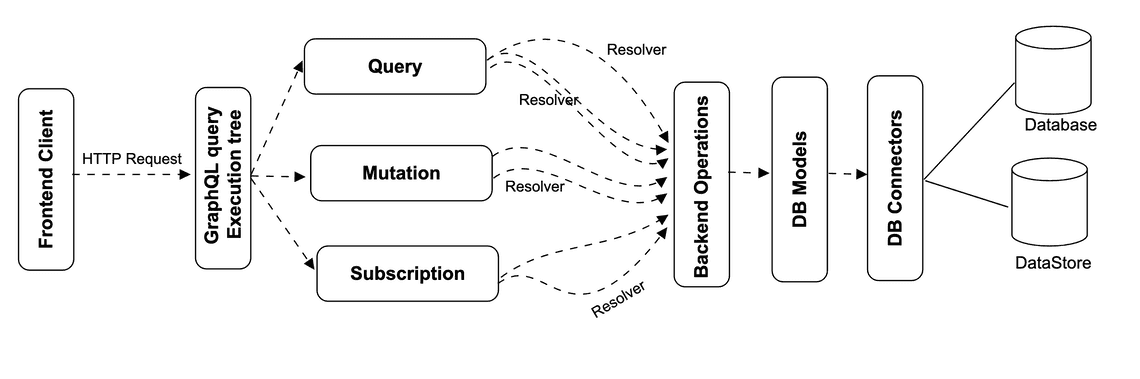
The web server is built on NodeJs and Express framework. A request is made to the Apollo GraphQL Server by ReactJS application (built using Apollo Client library) or GraphiQL browser application. The query will be parsed and validated against a schema defined in the server. If the request schema passes the validation, then the associated resolver functions will be executed. The resolver will contain code to fetch data from an API or a database.
Let us create a very simple GraphQL based API endpoints to fetch all the patients information and also get detailed information for a single patient.
Create a project with following files:
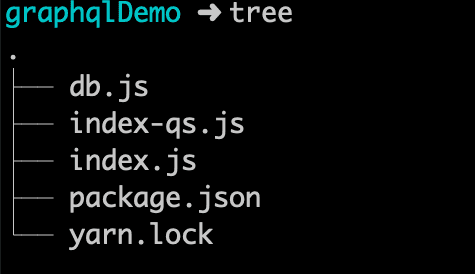
package.json file. All we did is install two libraries apollo-server and graphql.{
"name": "graphqlDemo",
"version": "1.0.0",
"main": "index.js",
"license": "MIT",
"dependencies": {
"apollo-server": "2.4.8",
"graphql": "14.2.1"
}
}
index.js file and define schema.const { ApolloServer, gql } = require("apollo-server");
const patient = require("./db");
const typeDefs = gql`
enum enumNameType {
official
usual
temp
nickname
anonymous
old
maiden
}
enum addressEnumType {
home
work
temp
old
billing
}
enum addressTypeEnum {
postal
physical
both
}
type Patient {
resourceType: String
id: ID!
active: Boolean
name: [NameSchema]
gender: String
address: [AddressSchema]
}
type AddressSchema {
use: addressEnumType
type: addressTypeEnum
text: String
line: String
city: String
district: String
state: String
postalCode: String
country: String
}
type NameSchema {
use: enumNameType
family: String
given: [String]
}
type Query {
patient: [Patient]
patientById(id: ID!): Patient
}
`;
const resolvers = {
Query: {
patient: () => patient,
patientById: (parent, args, context, info) => {
return patient.filter(item => item.id === args.id)[0];
}
}
};
const server = new ApolloServer({ typeDefs, resolvers });
server.listen().then(({ url }) => {
console.log(`🚀 Server ready at ${url}`);
});
db.js.const patient = [
{
"resourceType": "Patient",
"id": "patients0001",
"active": true,
"name": [
{
"use": "official",
"family": "Stark",
"given": [
"Arya"
]
},
],
"gender": "female",
"address": [
{
"use": "home",
"type": "physical",
"text": "The North, Winterfell",
}
],
},
{
"resourceType": "Patient",
"id": "patients0002",
"active": true,
"name": [
{
"use": "official",
"family": "Snow",
"given": [
"Jon"
]
}
],
"gender": "female",
"address": [
{
"use": "home",
"type": "physical",
"text": "The North, Winterfell",
}
],
},
{
"resourceType": "Patient",
"id": "patients0003",
"active": false,
"name": [
{
"use": "official",
"family": "Targaryen",
"given": [
"Daenerys"
]
}
],
"gender": "female",
"address": [
{
"use": "home",
"type": "physical",
"text": "The Crownlands",
}
],
},
{
"resourceType": "Patient",
"id": "patients0004",
"active": false,
"name": [
{
"use": "official",
"family": "Lannister",
"given": [
"Cersei"
]
}
],
"gender": "female",
"address": [
{
"use": "home",
"type": "physical",
"text": "The Westerlands",
},
{
"use": "home",
"type": "postal",
"text": "The Crownlands",
}
],
}
];
module.exports = patient;
yarn
node index.js
Your application should run at port 4000 and accessible to your by localhost. You should get a browser user interface with playground like figure 3.
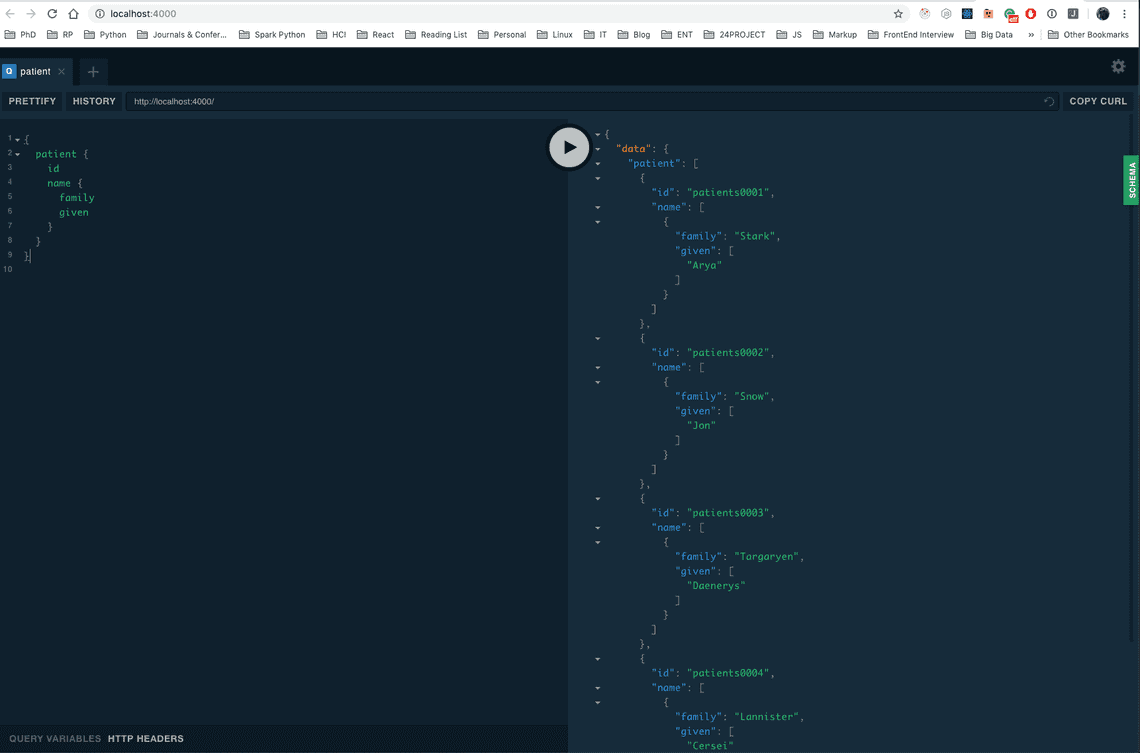
Let us get the list of patients name.
{
  patient {
    name {
      family
      given
    }
  }
}
Note with single implementation, we can control the attributes we want the endpoint to return. Provided, we are interested in getting id of the patients, we can modify the queries to:
{
  patient {
    id
    name {
      family
      given
    }
  }
}
Let us now query about a single Patient with id of patients0001. We can modify the quries as:
{
  patientById(id: "patients0001") {
    id
    name {
      family
      given
    }
  }
}
Download complete working code here. Click here.
I have composed another article about how query is parsed, and validated before executing. Learn how a GraphQL query is parsed and validated here.
GraphQL is a protocol and a query language. GraphQL API can access data stores directly but for most use cases GraphQL API is a data aggregator and an abstraction layer. The layer that improves velocity of development, decreases maintenance and makes developers happier. For these reasons, GraphQL makes even more sense for a public API. GraphQL is meant to be used for client applications, where network bandwidth and latency are critical. It provides clients, the ability to query an object graph (a hierarchical structure of related objects). Using GraphQL, clients also get to choose what fields need to be included in the response. This makes it a whole lot simpler and easier to use and manage data fetching on the client’s end.

Quick Links
Books Authored by Me